Sonar — Camera-Verified Reps
How the camera counts reps, why it's private, and how to set up.
What is Sonar?
Sonar turns your device's camera into a personal rep counter. Prop up a phone, tablet, or laptop, do your exercise, and Sonar counts every push-up, squat, and jumping jack for you — with a cheerful chime and a big on-screen number for every rep, hands-free. No wearables, no extra equipment, nothing to buy.
Just like a submarine's sonar "sees" shapes without taking pictures, our Sonar watches the shape of your movement — a simple stick-figure skeleton — not a video of you. It knows when a squat is deep enough, when a push-up bends far enough, and when a plank is flat enough. Good reps count; sloppy reps get a friendly coaching cue instead.
Reps counted by Sonar are verified — they power the fair-play parts of Deep Sea Dry Land: personal & team records and the treasure chests that come with them.
How a Sonar workout works
- Step 1: Prop up your deviceLean your phone or laptop against something stable so the camera can see you — about waist height works well. For most exercises you'll want enough room to step back so your whole body fits in the frame.
- Step 2: Follow the on-screen setup guideBefore anything starts, the app shows you exactly how to stand — including a reference photo of the correct stance — and gives live cues like "Step back — your feet are cut off" or "Move left." A body outline turns green when you're in position.
- Step 3: 3… 2… 1… Go!Once you hold the ready position for about a second, a beeping countdown starts. When it hits Go, the camera picture disappears and is replaced by your moving skeleton — that's Sonar's view of you.
- Step 4: Train — Sonar counts and coachesEvery clean rep is counted with a big on-screen number and cues like ARMS UP and RESET. If your form slips (say, push-ups from the knees), that rep simply doesn't count and a tip tells you why. Hold exercises like planks time you instead: stay in position and the clock climbs toward your target.
- Step 5: Results are saved — numbers onlyWhen you finish, only the results are saved: how many reps, how long you held, and when. These show up on your dashboard marked as Sonar-verified. No video, no photos — ever.
Why Sonar is safe and private
Sonar was designed for youth sports from day one, so privacy isn't a setting — it's the architecture. Here is exactly what happens with the camera, in plain English:
Sonar is completely separate from photo uploads (like profile pictures), which have their own protection: every uploaded image is AI-screened before anyone can see it. Read more in Athlete Safety.
Why athletes (and coaches) love it
Front-facing or side-facing? Here's the trick
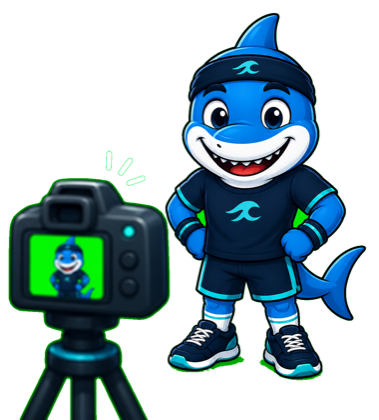
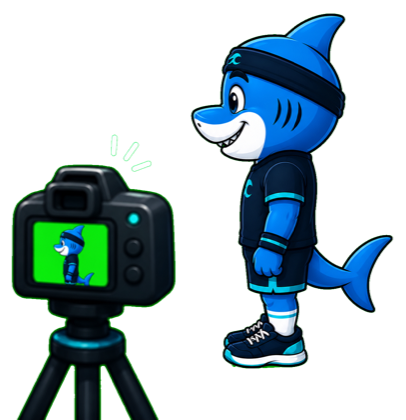
Some exercises want you facing the camera, and some want you standing side-on (turned 90°, like the camera is watching your profile). There's a simple rule of thumb:
Every Sonar exercise, at a glance
| Exercise | Camera stance | How to start | Pro tip |
|---|---|---|---|
| Jumping Jacks | Face the camera | Stand tall, feet together, arms at your sides. | Face the camera; keep your whole body — hands and feet — in frame. |
| High Jumps | Face the camera | Stand tall, ready to jump. | Face the camera a few feet back so your whole body stays in frame. Jump as high as you can. |
| Squat Hold | Face the camera | Stand tall — you'll drop into a squat and hold. | Face the camera. Drop into a squat (thighs ~parallel to the floor) and hold it. |
| Jump Rope | Face the camera | Rope in your hands, stand tall. Standing close is fine — waist-up works. | Face the camera — close up is fine, hips and shoulders in view. Quick little hops! |
| Push-ups | Stand side-on | Top of a push-up: arms straight, body in a straight line. | Point the camera from the side. Keep a straight line from shoulders to ankles — no knees, hips level. |
| Sit-ups | Stand side-on | Lie on your back, knees bent, feet flat. | Point the camera from the side. Lie back fully, then curl all the way up. |
| Squats | Stand side-on | Stand tall, feet shoulder-width apart. | Stand side-on to the camera a few feet back. Stand tall, then squat until your thighs are parallel. |
| Lunges | Stand side-on | Stand tall, feet together. | Face the camera or stand side-on. Step one leg forward and lower until your front knee bends ~90°. |
| Plank | Stand side-on | Forearms on the ground, body flat and level. | Get in a forearm plank — elbows on the ground, body flat and level — and hold. Film from the side. |
Tips for a great Sonar session
- Light from the front, not behind. A window or lamp behind you turns you into a silhouette. Face the light instead.
- Whole body in frame. For most exercises Sonar wants to see you head to toe — the setup guide will tell you to step back if your feet are cut off. (Jump rope is the exception: waist-up is fine, so you can stand close.)
- Stable device, roughly waist height. A chair seat, a step, or a low shelf beats holding it or laying it flat on the floor.
- Clear a little space. A couple of big steps in each direction is plenty — enough to spread your arms and hit the floor for push-ups.
- Wear regular workout clothes. Sonar doesn't care about colors, but very baggy hoodies can hide your elbows and knees from the tracker.
- One athlete at a time. Sonar tracks a single body — siblings and pets photobombing can confuse the count.